Lead Captured · API · Forms · Import Qualified → Auto Create Contact & Deal Deal Won → Project Instantly Created Send Contract · Your Terms · Your Client Send Welcome → Client Workspace Deployed Client Uploads Assets · Structured Onboarding Tasks Sync → Kanban · Calendar · Reminders Execution Tracked · Every Action Logged Delivery Completed · Full Timeline Recorded Repeat the Loop · Scale Without Chaos Lead Captured · API · Forms · Import Qualified → Auto Create Contact & Deal Deal Won → Project Instantly Created Send Contract · Your Terms · Your Client Send Welcome → Client Workspace Deployed Client Uploads Assets · Structured Onboarding Tasks Sync → Kanban · Calendar · Reminders Execution Tracked · Every Action Logged Delivery Completed · Full Timeline Recorded Repeat the Loop · Scale Without Chaos
Glass Hero Section
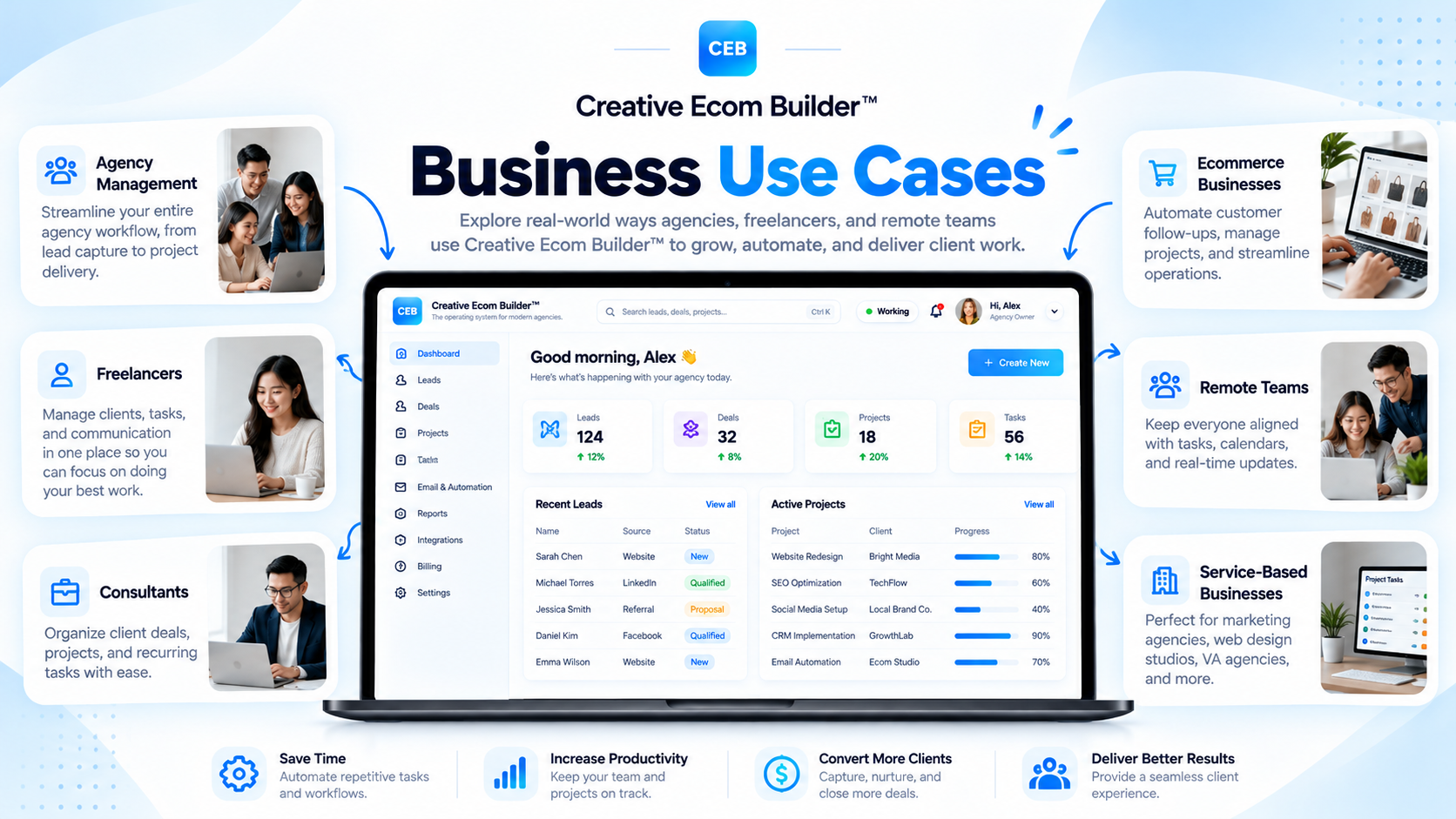
Business Use Cases

One Platform. Multiple Ways to Run Your Business.

Discover how Creative Ecom Builder™ supports connected agency and service business operations.

Every business has its own way of attracting clients, managing opportunities, delivering services, and coordinating daily operations. Creative Ecom Builder™ brings these activities together in one connected workspace.

Explore practical business use cases for agencies, freelancers, consultants, and growing service teams—from lead management and revenue tracking to client onboarding, project delivery, and workforce coordination.

Agency Management Business Workflow Automation Client Operations
Creative Ecom Builder business use cases for agencies, freelancers, consultants, and service businesses using connected agency management software

Explore practical ways to connect client management, agency workflows, and business operations.

↗
Attract & Convert

Capture leads and manage sales opportunities.

◎
Onboard Clients

Coordinate contracts and client workspaces.

✓
Deliver Services

Organize projects, tasks, and deadlines.

⌘
Run Operations

Manage communication and business activity.

Built around real business workflows

More than managing contacts. Connect the entire operation.

Creative Ecom Builder™ is designed for businesses that need more than a standalone CRM or task manager. It connects the operational steps that happen before, during, and after a client engagement—helping you manage the journey from the first inquiry to completed delivery.

01 / Who It’s For

Who Can Use Creative Ecom Builder™?

The platform supports businesses that manage leads, client relationships, projects, service delivery, and ongoing operational work.

◈

Digital & Creative Agencies

Coordinate multiple client engagements, sales opportunities, project teams, contracts, and delivery workflows from one workspace.

  • Manage incoming client inquiries
  • Track proposals and deal progress
  • Organize projects and team tasks
  • Coordinate client onboarding
Explore agency use case →
✦

Freelancers & Independent Professionals

Bring client acquisition, project administration, communication, and service delivery into a more organized operating system.

  • Track prospects and opportunities
  • Prepare contracts and invoices
  • Manage project tasks and deadlines
  • Maintain client workspaces
Explore freelancer use case →
◎

Consultants & Advisors

Structure the journey from an initial inquiry and proposal to client onboarding, scheduled work, and ongoing engagement delivery.

  • Organize prospective clients
  • Track proposals and sales stages
  • Coordinate agreements
  • Monitor client work and follow-ups
Explore consultant use case →
⌘

Service-Based Businesses

Connect sales administration with the practical work involved in preparing, organizing, and delivering client services.

  • Capture and qualify service inquiries
  • Prepare estimates and invoices
  • Organize service projects
  • Coordinate client communication
Explore service business use case →
▦

Small Business Owners

Get a more connected view of sales, client activity, operational tasks, revenue indicators, and day-to-day administration.

  • Review business activity
  • Monitor pipeline and revenue
  • Organize client work
  • Keep operational tasks visible
Explore connected workflows →
↗

Growing Teams & Agencies

Coordinate internal responsibilities and client delivery with available employee, scheduling, and workforce management tools.

  • Manage employee access
  • Coordinate assignments
  • Review timesheets and activity
  • Monitor project workload
Explore team use case →
02 / Agency Operations

Use Case: Managing a Digital or Creative Agency

Connect client acquisition, sales management, onboarding, project delivery, and team coordination across agency operations.

Agencies often manage several moving parts at once: incoming inquiries, prospective clients, proposals, contracts, active projects, deadlines, team responsibilities, and client communication. When these processes are scattered across separate systems, it becomes harder to maintain visibility from the first sales conversation through final delivery.

Creative Ecom Builder™ connects these stages so an agency can organize its client pipeline and delivery operations in one environment.

Example agency workflow

From new inquiry to completed client project

A digital agency receives a new website or marketing service inquiry. The lead enters the workspace, is reviewed and qualified, and progresses into the sales pipeline. Once the opportunity is won, the project workflow begins.

  • Review and qualify incoming leads.
  • Track proposals and deal stages.
  • Prepare and send client contracts.
  • Organize projects, tasks, and deadlines.
  • Coordinate team responsibilities where enabled.
Connected process
New Lead→Qualified→ Deal Won→Project→Delivery
Operational benefit: Sales and delivery information stay connected, giving the agency a clearer path from client acquisition to project execution.
03 / Independent Work

Use Case: Managing a Freelance Business

Organize independent client work without treating every inquiry, contract, project, and invoice as a separate administrative process.

Freelancers and independent professionals often handle multiple responsibilities themselves: finding clients, responding to inquiries, preparing proposals, managing agreements, tracking project work, and communicating with clients.

Creative Ecom Builder™ provides a connected workspace for managing these activities. A freelancer can keep prospective clients organized, track deal progress, create project records from won opportunities, and manage tasks and client information during delivery.

01

Organize Client Inquiries

Capture new prospects and maintain a structured view of potential freelance projects.

02

Track Opportunities

Manage prospective work through the sales pipeline and monitor potential revenue.

03

Manage Client Projects

Connect won opportunities to projects and organize tasks, due dates, and delivery progress.

04

Prepare Client Documents

Use the available contract, estimate, and invoice tools to support client administration.

05

Centralize Communication

Use the available email and client workspace tools to support ongoing client coordination.

06

Review Business Performance

Monitor available revenue and pipeline indicators to understand your freelance business activity.

04 / Consulting Operations

Use Case: Managing Consulting & Advisory Engagements

Bring prospect management, proposals, agreements, client coordination, and engagement tasks into one connected workflow.

Consultants and advisors need a clear process for managing prospective clients and the work that follows a successful engagement. This may include reviewing inquiries, discussing service requirements, preparing a proposal, confirming an agreement, and coordinating the activities required to deliver the service.

Creative Ecom Builder™ can support this operating model by connecting lead management, the Deals pipeline, contracts, project creation, task management, and client communication.

Example consulting workflow

Keep client engagements organized from proposal to delivery

A prospective client contacts a consulting business. The opportunity is qualified and tracked through the sales process. Once the engagement is won, the project can be created and the next client onboarding steps can be managed.

Inquiry→Qualification→ Proposal→Agreement→Engagement
Useful platform areas: Lead management, sales pipeline, contract workflow, project management, client workspace, calendar, and activity history.
05 / Service Delivery

Use Case: Running a Service-Based Business

Connect service inquiries and sales administration with estimates, client records, project organization, and delivery activities.

Service-based businesses need to manage more than customer details. They also need to understand the work requested, organize proposed services, coordinate agreements, prepare relevant financial documents, and keep delivery tasks visible.

Creative Ecom Builder™ supports this process through connected lead and deal records, estimates and calculator tools, contracts, invoices, client workspaces, and project management features.

↗

Service Inquiry Management

Capture incoming requests and organize prospective client information.

▤

Estimates & Cost Planning

Prepare estimates and use the available calculator to work through proposed project costs.

✓

Agreements & Invoices

Manage relevant client contracts and invoices as part of the service administration process.

▦

Project Organization

Turn won opportunities into project records and organize the work required for delivery.

◎

Client Coordination

Use the client workspace for relevant communication, file collection, and project information.

⌘

Operational Tracking

Review tasks, deadlines, activity history, and available business performance indicators.

06 / Team Coordination

Use Case: Coordinating a Growing Team

Bring internal work coordination and client delivery into a more organized operating environment as your business grows.

As an agency or service business grows, work becomes distributed across employees, projects, and responsibilities. Owners and managers need visibility into assignments, task progress, schedules, and operational activity.

For eligible plans, Creative Ecom Builder™ includes workforce-related capabilities that support employee access, clock-in and clock-out activity, timesheets, schedules, assignments, and time-off requests. These tools complement the platform’s project and task management workflows.

01

Employee Access

Provide team access according to the workspace permissions and subscription capabilities.

02

Task Assignments

Organize work and coordinate responsibilities across supported project and task workflows.

03

Time & Timesheets

Use available clock-in, clock-out, and timesheet tools to record employee work activity.

04

Schedules

Coordinate team schedules through the available workforce management features.

05

Time-Off Requests

Manage supported employee leave and time-off request workflows.

06

Workload Visibility

Review available task, project, and activity information to understand ongoing work.

Plan consideration: Workforce and employee management capabilities are subscription-dependent. Check the current plan details to confirm which tools are included.
07 / Connected Business Workflows

How Different Business Activities Work Together

The platform’s value comes from connecting related records and actions across the business—not simply placing unrelated tools in one dashboard.

Workflow 01 / Lead to Sales

Turn incoming inquiries into organized opportunities

Capture leads from supported sources, review their scoring information, qualify suitable prospects, and move them into the sales process.

Lead Capture→Lead Scoring→Qualification→Contact + Deal
Workflow 02 / Sales to Delivery

Connect a successful deal to project execution

When an opportunity reaches a Won status, the corresponding project is created so the business can proceed with the delivery workflow.

Sales Pipeline→Deal Won→Project Created→Tasks & Delivery
Workflow 03 / Client Onboarding

Move from agreement to a dedicated client workspace

Prepare and send the contract, allow the client to complete the signing step, and send the welcome email when you are ready to initiate client workspace creation.

Project→Contract→Client Signs→Welcome Email→Client Workspace
Workflow 04 / Ongoing Operations

Keep business activity visible during delivery

Manage project tasks, review deadlines, coordinate communication, organize financial documents, and use activity information to monitor ongoing operations.

Projects+Tasks+Communication+Invoices+Activity
How automation works: These are predefined connections within the platform. Some events trigger supported record creation automatically, while decisions and client-facing actions remain under the user’s control.
08 / Business Outcomes

What a Connected Operating System Helps You Improve

By connecting the workflows behind business operations, teams can build a clearer and more organized way to manage their work.

↗

Better Lead Organization

Keep prospect information, lead qualification, and sales opportunities in a structured workflow.

◎

More Connected Client Management

Connect client records, contracts, onboarding activities, and project information.

✓

Clearer Project Execution

Organize projects, tasks, Kanban stages, calendars, and delivery responsibilities.

⌘

Revenue Visibility

Review pipeline value, revenue targets, and available performance indicators.

▤

Organized Administration

Keep relevant contracts, estimates, invoices, and communication connected to client work.

▦

Operational Awareness

Use activity history, overdue indicators, and available workload information to understand business activity.

09 / Frequently Asked Questions

Business Use Cases FAQs

Common questions about the businesses and operating workflows supported by Creative Ecom Builder™.

What types of businesses can use Creative Ecom Builder™?

The platform is designed for agencies, freelancers, consultants, service-based businesses, small business owners, and growing teams that manage clients, projects, and business operations.

Is Creative Ecom Builder™ suitable for digital agencies?

Yes. Its connected workflows support lead management, sales pipelines, contracts, client onboarding, project management, tasks, communication, and team operations where available.

Can freelancers use the platform without a large team?

Yes. Freelancers can use the platform to organize leads, manage opportunities, prepare client documents, track projects, and coordinate client work. Available features depend on the selected plan.

Can service businesses manage estimates and invoices?

The platform includes estimate and calculator tools, along with invoice management capabilities for supported client and project workflows.

Can the platform manage both sales and project delivery?

Yes. A qualified lead can create Contact and Deal records, and a Deal marked as Won triggers creation of the corresponding Project.

Can clients access their own workspace?

Yes. The client portal uses a token-based access link that can be shared with clients. Clients do not need to create a separate platform account to access the portal.

Can a growing agency coordinate employees?

Eligible plans include workforce-related capabilities such as employee access, time tracking, timesheets, schedules, assignments, and time-off requests.

Does every business need to use every module?

No. Businesses can use the modules relevant to their operating needs and subscription. The connected platform is designed to support different workflows rather than require every business to follow the same process.

Can I connect external lead sources?

The public API supports connecting compatible lead sources to a workspace. Users can configure their own supported integrations using their workspace credentials.

Do I need another automation platform for the built-in workflows?

The predefined connections between supported platform modules are built into Creative Ecom Builder™. External automation tools may still be useful for workflows outside those built-in connections.

Are all features available on every subscription?

No. Some modules and workforce capabilities depend on the selected plan. Check the official pricing page for current feature availability and workspace limits.

Where can I learn more about the platform?

Visit the official documentation page for platform guidance and the features section to explore the individual modules.
Explore the Platform

See How the Modules Work Together

Explore the capabilities behind the business use cases and discover how each part of Creative Ecom Builder™ supports your operations.

↗

Lead & Sales Management

Explore lead capture, qualification, Contacts, Deals, and revenue pipeline management.

Explore CRM & Sales →
▦

Project Management

Learn how projects and tasks support organized client delivery.

Explore Projects →
Bring your business operations together

Build a more connected way to run your business.

From lead acquisition and revenue management to client onboarding and project execution, Creative Ecom Builder™ gives your business one connected environment for managing the work behind every client relationship.

Creative Ecom Builder™ — Agency management software, connected workflows, and business operations.