Agency Management Software
How to Automate Agency Workflows and Save Hours Every Week
Running an agency involves more than delivering great work. You also have to manage leads, follow up with prospects, track deals, organize projects, assign tasks, and monitor performance. By automating repetitive agency workflows, you can reduce manual administration, keep information connected, and give your team more time to focus on clients and growth.
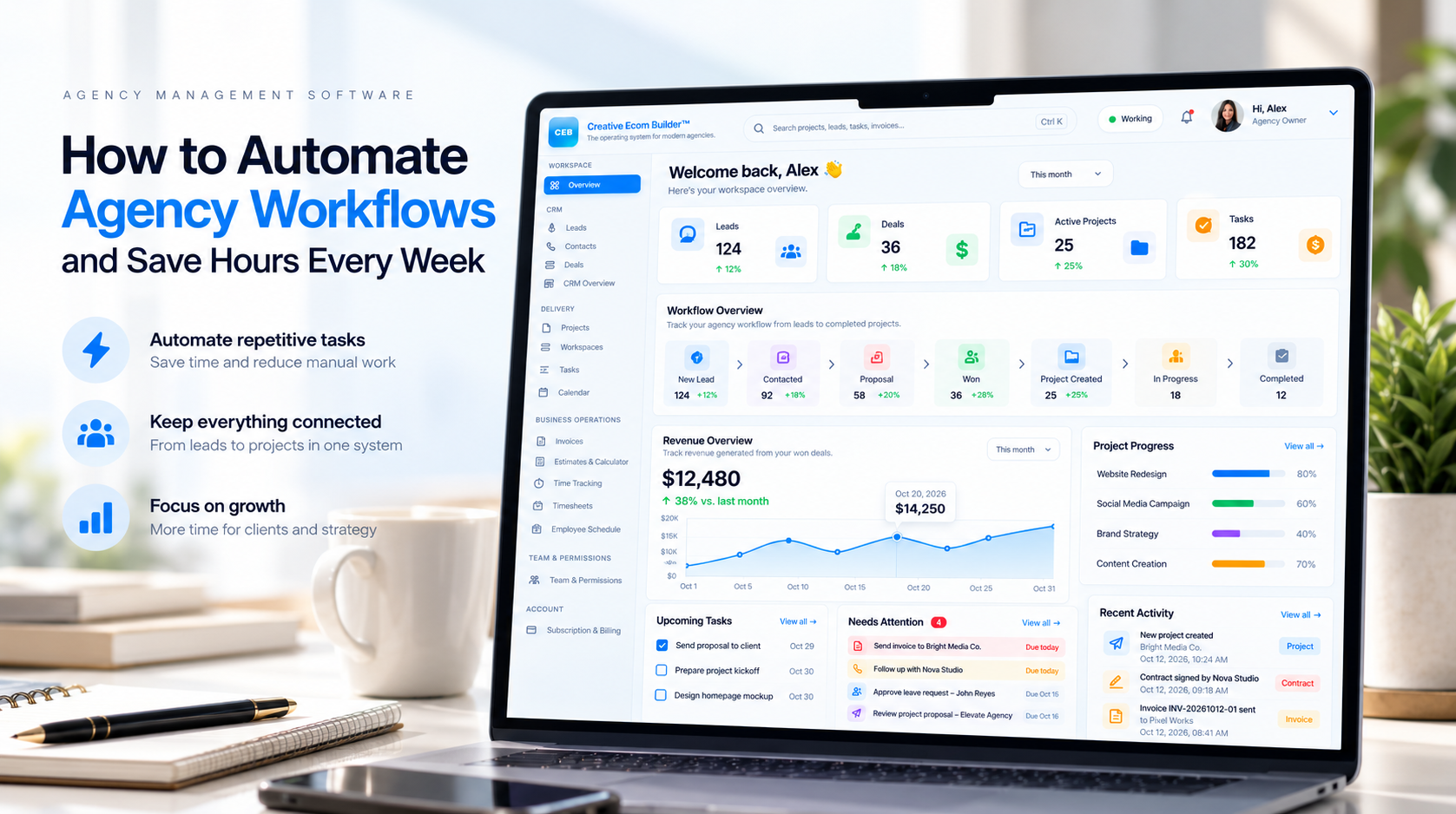
The right agency management software can help bring everyday operations into one connected system. Instead of repeatedly copying information between tools, your team can follow a consistent process from the first inquiry to project delivery.
Workflow automation is not about automating everything. It is about identifying repetitive steps, connecting the right information, and making routine work more consistent without losing human oversight.
What Is Agency Workflow Automation?
Agency workflow automation uses software and predefined rules to move work through a business process with fewer manual steps. When a specific event occurs, the system can perform an appropriate action automatically.
For example, an agency workflow might look like this:
01. Capture a lead
Collect a prospect’s details through a website form and create a structured lead record for the team.
02. Manage the opportunity
Organize the prospect in a sales pipeline so the team can track conversations, deal stages, and follow-up actions.
03. Start the project
When a deal is marked as won, create the project and carry relevant client information into the delivery process.
04. Coordinate delivery
Organize project tasks, deadlines, responsibilities, and progress so everyone understands what needs to happen next.
The goal is to create a clear connection between sales and delivery. Teams spend less time reconstructing information and more time acting on it.
Why Manual Agency Workflows Slow You Down
Manual processes may seem manageable when you have only a few clients. As the agency grows, however, small administrative tasks can accumulate across leads, deals, projects, and internal communication.
- Repeated data entry: copying the same client information into multiple systems.
- Missed follow-ups: relying on memory or scattered reminders to contact prospects.
- Unclear ownership: leaving team members unsure about who is responsible for the next step.
- Delayed project kickoffs: waiting for someone to manually transfer information after a deal closes.
- Limited visibility: switching between tools to understand project progress and business activity.
These problems are not always caused by a lack of effort. Often, they happen because the underlying process depends on too many disconnected steps.
7 Agency Workflows You Can Automate
1. Lead Capture and Organization
Start by connecting your website’s inquiry forms to your lead management system. A new submission can create a lead record, preserve the submitted details, and make the inquiry visible to the appropriate team.
Establish clear lead stages and decide what information your team needs before moving a prospect forward. Where supported, automated scoring rules can also help prioritize inquiries according to your criteria.
2. Sales Pipeline Management
A consistent sales pipeline makes it easier to see whether an opportunity is new, contacted, under discussion, proposed, or won. Define what must happen at each stage and use reminders or workflow rules where appropriate.
This gives your team a shared view of opportunities and reduces reliance on private spreadsheets or individual memory.
3. Deal-to-Project Handoffs
One of the most valuable agency automations is connecting sales to project delivery. When a deal is won, the system can create a project, where that functionality is available, instead of requiring someone to start the entire process from scratch.
Define the information that needs to carry over, such as the client, service, project owner, agreed scope, and next steps. Review the handoff before work begins to catch missing details.
4. Task Creation and Assignment
Standardize repeatable work with task templates or predefined task lists. A website project, for example, might require discovery, content collection, design, development, quality assurance, and launch.
Assign owners and deadlines, then use supported automation to create routine tasks when a project reaches the appropriate stage.
5. Client Communication and Follow-Ups
Establish a repeatable communication process for inquiries, onboarding, project updates, approvals, and overdue responses. Templates can make messages more consistent, while reminders help your team follow up on time.
Automate only the messages that are appropriate for automatic delivery. Sensitive client conversations and unusual situations may still require a personal response.
6. Project Progress and Deadline Tracking
Use a shared project board, task list, or calendar to make responsibilities and deadlines visible. Where the software supports it, status changes can trigger notifications or update related records.
Agree on clear project statuses so the team can distinguish work that is planned, in progress, waiting for input, and completed.
7. Revenue and Operational Reporting
Bring relevant sales and delivery metrics into a consistent reporting process. Depending on your system, useful indicators may include deals won, active projects, overdue tasks, invoiced revenue, and upcoming deadlines.
Make sure each metric has a clear definition. For example, revenue from won deals is not necessarily the same as cash collected or invoices paid. Accurate definitions make dashboards more useful for decision-making.
How to Build a More Efficient Agency Workflow
You do not need to automate every process at once. Begin with a workflow that happens frequently, involves several manual steps, and has a clear outcome.
Step 1: Map the current process
Write down what happens from the initial trigger to the final result. Include who performs each step, which tools are involved, and where delays or duplicate work occur.
Step 2: Identify repetitive actions
Look for tasks such as creating records, assigning standard tasks, transferring client details, updating statuses, and sending routine notifications. Choose actions that follow predictable rules.
Step 3: Define the automation rules
Specify the trigger, the required conditions, the action to perform, and the expected result. For example: when a deal is marked as won, create a project using the appropriate project template.
Step 4: Test before rolling it out
Use test records to verify that information transfers correctly, duplicate records are handled appropriately, and unexpected events do not create incorrect tasks or projects.
Step 5: Measure the results
Compare the time required, the number of manual steps, error rates, and missed handoffs before and after introducing automation. Use the findings to decide what to improve next.
Choosing Agency Management Software for Automation
The best tool is not necessarily the one with the longest feature list. Look for software that supports the workflows your agency actually uses and keeps the necessary information accessible to the right people.
| Capability | What to look for |
|---|---|
| Lead management | Structured lead records, clear stages, and a reliable capture process. |
| Sales pipeline | Visible deal stages, ownership, and consistent handoffs. |
| Project management | Project records, task organization, deadlines, and progress tracking. |
| Workflow automation | Useful triggers and actions that match your real operating process. |
| Reporting | Accurate metrics for sales, project delivery, and business performance. |
| Usability | A straightforward interface that your team can learn and use consistently. |
Also evaluate pricing, permissions, data access, integrations, support, and the process for exporting your information. Confirm that the features you need are included in the plan you choose.
How Creative Ecom Builder™ Connects Agency Operations
Creative Ecom Builder™ brings key agency operations into a connected workspace. Its workflow connects lead management, deals, projects, tasks, and operational visibility instead of treating every activity as an isolated process.
A connected workflow can follow this sequence:
- A prospect submits information through your website.
- The lead is captured and organized in the lead management system.
- The opportunity moves through the deals pipeline.
- When the deal is won, a project can be created automatically.
- Project tasks and delivery work can be organized in the workspace.
- Dashboards provide visibility into relevant business activity.
The benefit of connecting these steps is continuity. Your team can spend less time manually transferring information between stages and more time managing relationships, delivering work, and making informed decisions.
Automation works best when your processes are clearly defined. Review permissions, data accuracy, task ownership, and exception handling before relying on any automated workflow for day-to-day operations.
How Much Time Can Agency Workflow Automation Save?
The time saved depends on how frequently a task occurs, how long it takes today, and how much of the process can safely be automated. Rather than promising a fixed number of hours, calculate the opportunity using your own workflow data.
A simple estimate is:
Estimated weekly time saved = (manual minutes per task − automated minutes per task) × tasks per week ÷ 60
For example, if a process takes 10 minutes manually, takes 2 minutes to review after automation, and occurs 30 times per week, the estimated time saved is 4 hours per week.
This is an illustrative calculation, not a guarantee. Include setup, monitoring, exception handling, and maintenance when evaluating actual results.
Frequently Asked Questions
What is the best way to automate agency workflows?
Start with a frequent, repeatable process such as lead capture, task creation, or deal-to-project handoffs. Map the steps, define clear rules, test the automation, and measure the results before expanding it.
Can small agencies benefit from workflow automation?
Yes. Small agencies can use automation to reduce repetitive administration, standardize routine work, and improve visibility without necessarily adding more tools or administrative steps.
Is a CRM enough for managing an agency?
A CRM can be sufficient when your main need is managing contacts and sales. Agencies that also need connected project delivery, task management, scheduling, and operational reporting may benefit from a broader agency management system.
Does automation eliminate the need for human oversight?
No. Automation can handle predictable steps, but people still need to review exceptions, make decisions, protect client information, and ensure the work meets the required standard.
How do you measure the success of workflow automation?
Track time spent on the process, completion speed, error rates, missed handoffs, and the amount of manual intervention required. Compare the results against your baseline.
Spend Less Time Managing Processes. Focus More on Growing Your Agency.
Explore Creative Ecom Builder™ and see how connected lead management, deal tracking, projects, and tasks can support a more organized way to run your agency.
Explore Creative Ecom Builder